Showing posts with label Computers. Show all posts

Thursday, June 19, 2008

World Machine 2

One of my many interests is cartography; I love maps. An offshoot of this is an interest in “designing” my own terrain from small valleys all the way up to entire worlds. I guess you could say I like playing god (okay, so I’m a megalomaniac).

There are many software packages out there that aid this design. One such program is called World Machine. This program uses complex algorithms to produce realistic terrain features. The author of this software is about to release his second version of it with greatly expanded features. I am excited to test this out since it looks like I’ll be able to more easily design multiple landscapes to the detail that my anal retentiveness requires and seamlessly combine them to make a realistic continent and even world.

I’ve been watching his progress for over a year and now the end is almost here. July 4th is his release date; this is going to be fantastic!

Thursday, January 31, 2008

Let the buying begin
It’s only plastic afterall!

Now that I’ve my computer up and running, my eye is starting to look for other wonderful geeky toys. Of the current possibilities, one is actually justifiable while the other is pure entertainment.

Canon LiDE 600F
This, my friends is a pretty cool scanner. I have always been on the lookout for a scanner that will copy photographic negatives yet also do a good job with standard scanning as well. Many of the reviews I have read on this seems to indicate that it is actually a good unit. On top of it all, this baby is powered via the USB cord so no extra power cords are required. Once my tax return arrives, I’m taking this one home.

Belkin n52 TE Tournament Edition
Now something for the gaming geek in me. This game pad is actually an upgrade for one I already own. Yup, I have the n52 SpeedPad and I love it. But this one is definitely an upgrade if not just for the pretty blue back lighting! Hey, I’m easily amused. Besides, it matches the blue case lighting on my new computer!

Thursday, January 10, 2008

Obsession v2.0.3

Hmmm…

I forgot how having new toys makes me obsessive. This whole week I have been up past midnight and every hour at work I have the overwhelming desire to leave and go home to play on the computer.

Yes, the missed workout on Tuesday was because I stayed up late all weekend. However, the missing workout (that will be) tomorrow (Friday) will be due to the fact I have a short business trip that day.

Tuesday, January 08, 2008

Computer Build Update 2.0

So the new system is up and running. Except for one problem that required a hot fix from Microsoft (will talk about a little later), everything has gone smoothly.

Earlier I mentioned there were some issues that still needed to be addressed. Those, along with the results, are listed below:

  1. Attempt to get the second HD working,

  2. Doh, turns out that the power cable was not connected. All is well now.

  3. Attempt to see if I can get the CPU fan more secure,

  4. Did my best, I think it’s in there to stay. If not, you’ll hear about it via a major rant.

  5. Install the card reader that should arrive today,

  6. The installation was easy. Well, except it took me a bit of trial and error to figure out how the case 3.5 slot adaptor worked. I finally found a diagram that showed the correct way…

    “Me see pretty picture and make boxy thing fit good.”


  7. Reattach the SATA drives to different ports (the OS HD is currently on SATA port 3, I want it on 1) … yeah, I know, very anal of me,

  8. Yup, I actually did that. Both hard drives are now on SATA 1 and 2 (as it should be).

  9. Do a little bit more cable management since some are too close to some fans for my comfort,

  10. I was actually able to get more cables out of the way so it’s less messy in there now.

  11. Re-clock my memory (factory settings are worse than what it's rated at),

  12. This was surprisingly easy. The BIOS is very user friendly (well, at least to me).

  13. Figure out if I can get Vista to see all 4GB of memory (don’t think so),

  14. Never really looked into this.

  15. Figure out exactly where I'm putting the case in my room,

  16. The computer is exactly (to the nearest centimeter) where I want it. OK, just kidding about the centimeter; I’m not THAT anal!

  17. Do external cable management for all the wires of the 3 PCs (time to pull out that old KVM until I get everything I want off of the oldest computer (it's a P3) so I can give it away),

  18. Well, maybe I am THAT anal. I spent much of Saturday underneath the desk getting all the cables rolled, twisted, coiled, tied off, routed, wound, and installed so that they were all neat and tidy.

  19. Install all the software and transfer files to the new machine,

  20. I am still in the process of getting all the software installed.

  21. Clean up the mess in the living room (I assembled it there and the place looks like a tornado hit).

  22. Except for the coffee table, much of the living room is now clean.
Well, there you have it. The list is mostly complete.

As mentioned earlier, I had to get a hot fix from Microsoft. This was an issue with the way Vista manages memory. I’ll spare you the details but let’s just say that when I was running Everquest II (yup, I play games; isn’t that what life is all about?)… Anyway, I cranked the quality settings in the game up and ran around in game checking out how my system handled it. Around 20 minutes later, the game crashes and gives me an error stating “Application ran out of memory when requesting 2048592 (limit 2048)….” I was directed to the hot fix from the game’s tech support. Initial test seem to show that it works though I have not tested it for any length of time.

Friday, January 04, 2008

Computer Build Update

It took me awhile to install everything into the case last night. Unfortunately I started out trying to do "proper" cable management; what a pain. The GPU is so big that you really can't manage all of the cables well. However, the tangle that they are currently in has an artistic component so it does not bother me.

I am a little concerned about the CPU fan since I am not sure that it is properly seated but I didn't want to push too hard and crack the mobo. Two of the attachments are in, but the other side is where I am not sure. I think I can remove it and reseat it which I might try to do. I definitely do not want that thing coming loose and falling on the GPU; it'd pretty much be endgame at that point.

Other than that, the only other thing I had to guess on (the documentation SUCKED!) was where to attach the ground wire from the power supply. It said attach to the mobo and gave a tiny picture so I guessed, unscrewed one of the mobo attachment screws, and put the gound wire between the screw head and the washer. I think that is right.

Once everything was in, I hooked it up to the externals and it worked from the start (YEAH!). However, when installing Vista I got a BSoD (Blue Screen of Death) so I removed one of the memory modules and was able to install Vista with 2GB. Once that was done, I reinstalled the remaining card as well as connected the second HD.

Vista only recognizes 3.25GB memory (I think the 768Mb graphic card has sequestered the rest) and the second HD is not recognized in the BIOS.

So, tonight and this weekend I get to...

  1. Attempt to get the second HD working,

  2. Attempt to see if I can get the CPU fan more secure,

  3. Install the card reader that should arrive today,

  4. Reattach the SATA drives to different ports (the OS HD is currently on SATA port 3, I want it on 1) … yeah, I know, very anal of me,

  5. Do a little bit more cable management since some are too close to some fans for my comfort,

  6. Re-clock my memory (factory settings are worse than what it's rated at),

  7. Figure out if I can get Vista to see all 4GB of memory (don’t think so),

  8. Figure out exactly where I'm putting the case in my room,

  9. Do external cable management for all the wires of the 3 PCs (time to pull out that old KVM until I get everything I want off of the oldest computer (it's a P3) so I can give it away),

  10. Install all the software and transfer files to the new machine,

  11. Clean up the mess in the living room (I assembled it there and the place looks like a tornado hit).

... and anything else that comes up.

Oh, and finally, I need to get some sleep.

Thursday, January 03, 2008

Computer Parts

Today is the big day. The rest of the computer parts are scheduled to arrive this afternoon. Hopefully everything goes smoothly and nothing is DOA (Dead On Arrival). The pessimist in me says something will go wrong, the optimist in me says everything will work the first time around; we’ll see.

Once they arrive, I’m taking the rest of the day off from work to go home and assemble the new computer from the ground up. Hopefully they will arrive earlier rather than later though.

Thursday, December 27, 2007

Building a Computer

All of the parts for my new computer system have finally been ordered. I figured that if I spend a little bit more for a high(er) end system, it'd last me for many years to come and ultimately be more cost effective. Having said that, the total cost was still under $1,500 (after all the rebates are obtained). Note that a comparable system from Alienware or Dell would run in the $2,000's and up.

So, I placed the final order from Newegg last night and it should arrive next week. When that happens, I get to fun task of seeing if all of my research paid off and the parts all play nice together. I am looking forward to the experience though since I have never built an entire system from scratch. Unfortunately I will probably drive a couple of my friends crazy inundating them with computer building questions if the build does not go smoothly.

Now on to the important stuff; the final system specs are:


  • Antec Nine Hundred Black Steel ATX Mid Tower Computer Case
  • ABS Tagan BZ Series 700W Patent Piperock Modular Power Supply
  • ASUS P5N32-E SLI LGA 775 NVIDIA nForce 680i SLI ATX Intel Motherboard
  • Intel Core 2 Quad Q6600 Kentsfield 2.4GHz LGA 775 Quad-Core Processor
  • OCZ Vista Upgrade 4GB(2 x 2GB) SDRAM DDR2 800 (PC2 6400) Dual Channel Kit Desktop Memory Model
  • eVGA GeForce 8800GTX 768MB 384-bit GDDR3 PCI Express x16 Video Card
  • ASUS 20X DVD±R DVD Burner with LightScribe
  • (2x) Seagate Barracuda 320GB 7200 RPM SATA 3.0Gb/s Hard Drive
  • Microsoft Vista Home Premium

Everything was ordered from Newegg.com except Vista and the hard drives. Shipping was free for most of it (only paid $11.32) and there was no tax. On top of that, I’ll be getting $145 back in rebates so overall, while it’s more than I’m used to spending in one shot, I think it’ll work out well. To put it into perspective, I do love to nickel and dime my money away; hell, Starbuck’s coffee will hit my budget harder than this computer system will over the same timeframe.

Finally, the cool thing is that I will still be working out so sitting in front of this new system will not have that big of a negative effect on my fat content.

"Boonowa tweepi, ha, ha."

Tuesday, December 11, 2007

Disposable Income?

Ah, I’ve come full circle. Once again, it’s that time of year when I get the urge to collect electronic gadgets that I cannot afford. Of course, the best way to do that is to buy a brand new computer.

I’m still sold on building my own PC from the ground up. A preliminary look at Newegg.com shows that I could build a mightily powerful system for around US $1,800.

The best case I could find so far is still the Antec Nine Hundred (pictured here). Other than the fact that it has the power of a wind tunnel (to keep the internals cool), it’s got nifty blue lights. Now mind you, I kinda like Dell’s new XPS case better but beggars can’t be choosers. Building one will result in a much more powerful system than buying a comparably priced Dell one; best bang for the buck as they say.

Quick specs of the (maybe) soon to be built system (items may change without notice):

  • Intel Core 2 Quad 2.4 GHz
  • ASUS 775 NVIDIA nForce 680i SLI ATX Intel Motherboard
  • (4x) Corsair XMS2 1GB SDRAM DDR2 800
  • EVGA GeForce 8800GTX 768MB Video Card

If you would like to contribute to the Zero Point: Four “Buy Rob a New Computer” greed... uh, I mean "charity" fund, I’ve set up a PayPal account for you to donate to. Ha ha, just kidding! Well, only about the PayPal account.

Wednesday, October 03, 2007

Boys and Their Toys!

I have a new toy! Well not so new since it's used, but new to me nonetheless.

I visited my friend in Portland over the weekend and we got to talking about my continued desire to find a PDA that has a nice keyboard (the ones with the small buttons don't fit my fingers). It turns out that he still was up to selling off his old JasJar (pictured here) from i-mate.

The last time we talked about his selling it, I had a bit of a budget constraint so I passed. But this time, I was not so hard up for cash. After a bit of initial frustration, I am finding that I actually like the upgrade; even though I still love my old Dell Axim X5.

The frustration stemmed from the fact that the JasJar kept locking up on me and I had to do hard resets every time. It turns out that some of the programs I was trying to install were not compatible. After upgrading those programs, it worked like a dream.

Of course, since I’m so anal about customization, I have yet to get the entire thing up and running to a point that I can leave my Axim home. Carrying around two PDAs is a bit… cumbersome.

Monday, August 27, 2007

Two Core or Not Two Core

This year I’ve been pretty good about staying on budget. No new electronics have been purchased so I’m quite happy about that (and so is my pocketbook). Unfortunately, the temptations are back.

At work, I tend to multitask so my computer performance suffers. As a result, I finally requested a newer machine so it wouldn’t take so long to do anything. Well, the IT department finally set me up and that is where the problem has started.

The new computer has a dual core processor and 2Gb of RAM. My home machine is a single core with only 1Gb of RAM. See the problem? I was fine having my home machine better than my work machine (good excuse to “take work home since I can do it faster on my own computer”). But I have real issues with my personal computer being slower than the one I use all day at work.

Oh, the temptation to build a new system. I keep telling myself to wait until prices of quad cores come down but it is so hard to wait.

In my best “Comic Book Guy” impersonation, “Worst. Wait. Ever.”

Friday, December 01, 2006

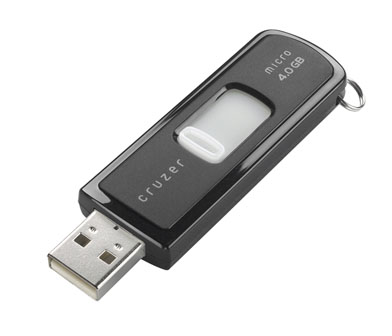
SanDisk Cruzer® Micro 4GB Flash Drive

So a couple of days ago I was trying to transfer some files and discovered that my little 250MB USB flash drive just didn’t have the needed space. Being the “any excuse to buy new computer-related equipment” type, I did the only “logical” thing; I went out and grabbed a new SanDisk Cruzer® Micro 4GB Flash Drive.

SanDisk Cruzer® Micro 4GB Flash DriveI have to say, I am pretty happy with the purchase (after the initial sticker shock of course). The added memory allows me to back-up the important files from my home computer and the U3 CruzerSync software makes the back-up quicker than hunting for the files each time I want to back them up. An added benefit of U3 is that I can be on other computers but use my personal favorites, contacts, and choice files without having to load them onto the computer; there’s even a virus scanner that loads from the flash drive to keep your files safe.

Of course, the lack of a protective cap in lieu of a retractable USB connector is da best... in fact, that was one of the main reasons I went for the Cruzer Micro. My only complaint is that I wanted to get the Titanium version but it only came as high as 2GB.

Thursday, October 26, 2006

It Hurts Us! Blink Blink!
Boy Do I Feel Stupid!

To update everyone on my computer woes, last night I went ahead and flashed my BIOS; I’ll try almost anything at this point. Still no Windows load, just that blinking cursor mocking me.

Okay, so I break down and get onto Dell Technical Support chat again. The chap runs me through different things ruling out possible problems; been there, done that! Anyway, we get to the point where he tells me the only possible problem is my hard drive boot sector and we need to reset it and repartition the drive.

But… but… but…. I already tried a different hard drive and it still didn’t work so it couldn’t possibly be a problem with the hard drive. Besides, even though I backed up the most critical data from that drive (see, it works), it would still be a pain in the ass to replace all the stuff that I was not able to backup.

Oh well, I caved in and went ahead and did what he requested. I fixed the boot sectors and then unpartitioned the drive. *cry* After the repartitioning and reformatting of the drive (which took 2 hours), I proceeded to install a fresh copy of Windows XP.

Well shiver me timbers, it worked! Windows loaded!

Now my brain starts to go into a logic loop with smoke coming out of my head. It made no sense! I already ruled out the hard drive issue. Now it works?! If the second hard drive didn’t work and the first one worked after it didn’t work, then the second one should have worked but didn’t while the first one didn’t but did… error… error… error… does not compute.

Meanwhile, the smoke detector in my place went off when my head caught fire and exploded.

Enter today. As far as I can figure, there is was sleight oversight on my part. I think that the second hard drive was not formatted with a boot sector (no OS originally on it) so the only way for one to be written is to reformat the drive and then install the OS; I did not do this. At least that’s my guess.

SO! Tonight, I get the fun task of reinstalling the software and trying to get the damn thing back onto my network.

----------
When you have a nice bonfire going, jump in the middle of it and warm yourself up.

Wednesday, October 25, 2006

The Short Road to Insanity!
Blink! Blink!

Last night I found the Dell Resource Disk that came with my computer. From this I was able to run system diagnostics on the computer… everything came up normal. Argh! This is definitely becoming interesting. Curse, grumble, curse! There seems to be no explanation why my computer will not boot all the way into Windows XP. Oh, and did I mention that F8 does not work? I can't even boot into Safe Mode (which would mean that I would not be having this problem). F2 and F12 work like a charm! But F8? Nooo! You'd think I was asking for a million dollars or something.

I think I’ll pull out my gargoyle statue and perform an exorcism on the computer tonight; maybe there’s a demon living in there (though I don’t think it will work if it’s just a gremlin infestation).

----------
When you see flames coming out of your computer, pour gasoline on it.

Tuesday, October 24, 2006

Still Blink, Blink, Blink!
...With One Fortunate Happenstance

Monday resulted in no fix for the failed computer. Actually, I never had the time to work on finding a solution. Instead, I thought it best to pull the hard drive and try to back up the data using my older computer (the one that works).

Unfortunately, my old computer’s hard drives are not very large so I had to pick and choose what data was irreplaceable. Even still, there was not enough room to back it all up.

Enter the iPod. I have a 60Gb iPod that is not very full. How fortunate is that? I had to start iTunes in order to switch the iPod to data mode so it will be visible as a storage device. To my surprise, when iTunes loaded, it went to the internet to look up music track information.

“What information did it find,” you ask? Well, none other than that for 98 Degrees: The Collection album! I had forgotten that I had left the CD in the drive. All of a sudden, the CD was recognized as an audio CD instead of just a data CD (see previous rant here). Cool! Before doing anything else, I had iTunes rip it and transfer the album to the iPod! Woot! Told you I’d have that music on the iPod! OK, so it wasn’t anything I did per se but still….

So, the iPod finally gets more music and now I start a major data transfer to it. After about a minute, the transfer comes up with an estimated time of completion in about 220 minutes! Yuck! It was already 10:30 pm and starting to get a little past my bedtime. Oh well, I left it running but woke up around 3:00 am and turned the computer off since the transfer was finished. Funny how an earthquake will not wake me, but the thought of needing to turn the computer off does.

I will waste yet another night tonight trying to fix the damn thing. Now you are up-to-speed on my computer misadventures.

----------
When smoke comes out of your computer, blow on it until you see flames.

Monday, October 23, 2006

Blank Screen With A Blinking Cursor
...Have a Great Weekend!

Ya gotta love computers! They are like spoiled brats that throw temper tantrums if you look at them wrong.

Friday night I come home and booted up both of my machines. One loaded Windows XP, the other did not. I think, “Interesting, this has never happened before… oh well, I’ll just ctrl-alt-del and reboot it.” OK, fine, so it starts its reboot process; gets through BIOS with no problem then hangs at a blank screen with a blinking cursor (BSBC)… no Windows XP.

Now I’m a little worried. “Great, just what I need, another money pit!” So I grab the installation CD and boot from that. First, I head into Recovery Console so I can run a chkdsk. Initially it says everything is fine so I add the old /p to tell it to do a full scan anyway. This comes up with some HD errors. “Cool,” I think, “all I need to do is fix the errors, run a repair of Windows and I’m back in business!” NOT! ! ! Damn thing goes through the process yet all I see is that stupid BSBC again.

Curse grumble curse! But oh well, just to make sure, I unplugged my master HD and turned my slave HD into a primary single drive (Drive 0). Started the computer with the installation CD in and proceeded to install a fresh copy of Windows XP. Installation goes fine and then on reboot I find myself once again at that damn BSBC! #$%@&!

Now I’m a little on the irritable side! So I use the computer that booted fine and hit the internet to try to find a solution. I spend Friday night, all day Saturday, and 4 hours Sunday on the internet trying to find a solution. Everything I did ended in failure. I even spent an extra 2 hours on internet chat with a nice chap from Dell Technical Support. All he did was run me through everything I already tried. I don’t think he fully understood what the problem was because every once in awhile, he’d type things like; “After the CHKDSK /R runs, see if your HD is found under ‘My Computer.’” Hmmm…. If I could get to ‘My Computer,’ that would mean that I am able to load Windows XP! If I was able to load Windows XP, then I would not be having the problem of not being able to load Windows XP now would I?

*takes breath and pulls hair out*

Well, I tried resetting CMOS by removing the battery from the motherboard for a couple of minutes with the computer unplugged… reset the BIOS but still no Windows load. I reseated the RAM, the HD, hey, I even dusted the damn inside with canned air at US$594.59 per bottle. OK, so the air was not that much but it still seems rather expensive just for a bottle of air… even bottled water isn’t that expensive! Hell, one person even got their problem to work itself out by letting the computer just sit at the BSBC for an hour… mine didn’t!

SO, today I bought a new CMOS battery (just ruling everything out). I will spend yet another night trying to solve this mystery.

----------
When your computer gives you lemons, kick it until smoke comes out!